終了時にメッセージウィンドウが表示されるようにします。
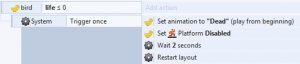
- 上記の “Restart layout” を削除
- Add action → System → Set layer visibleを選択し、Layer: “Popup”,Visibility: Visible
- Layout 画面に戻り右クリック → Insert new object
- 右上検索窓に “tou” と入力すると Touch が表示される → Touch → Insert
- 新たに Add event → System → Layer is visible → Layer: “Popup”
- ”System Layer “Popup” is visible”(の右側)をクリックして “s”
- touch → On touch object → replay を選択し Done